Currency
Drivest supports multiple currencies, which is useful if you travel across borders or buy fuel in different countries.
Default Currency
Your default currency is used for stats and summaries.
- Go to Settings > Currency.
- Select your default currency from the list.
All amounts on the Data tab are shown in your default currency.
A first-launch coachmark on the Currency row in Settings reminds you that this is where multi-currency tracking is configured. It dismisses itself after you tap the row.
Additional Currencies
You can add extra currencies to use when logging fill-ups, costs, or charging sessions in a foreign currency.
- Go to Settings > Currency.
- Tap Add Currency (requires a default currency to be set first).
- Select the currency from the list.
When you add a fill-up, cost, or charging session, a currency selector appears next to the price fields if you have more than one currency configured.
Exchange Rates
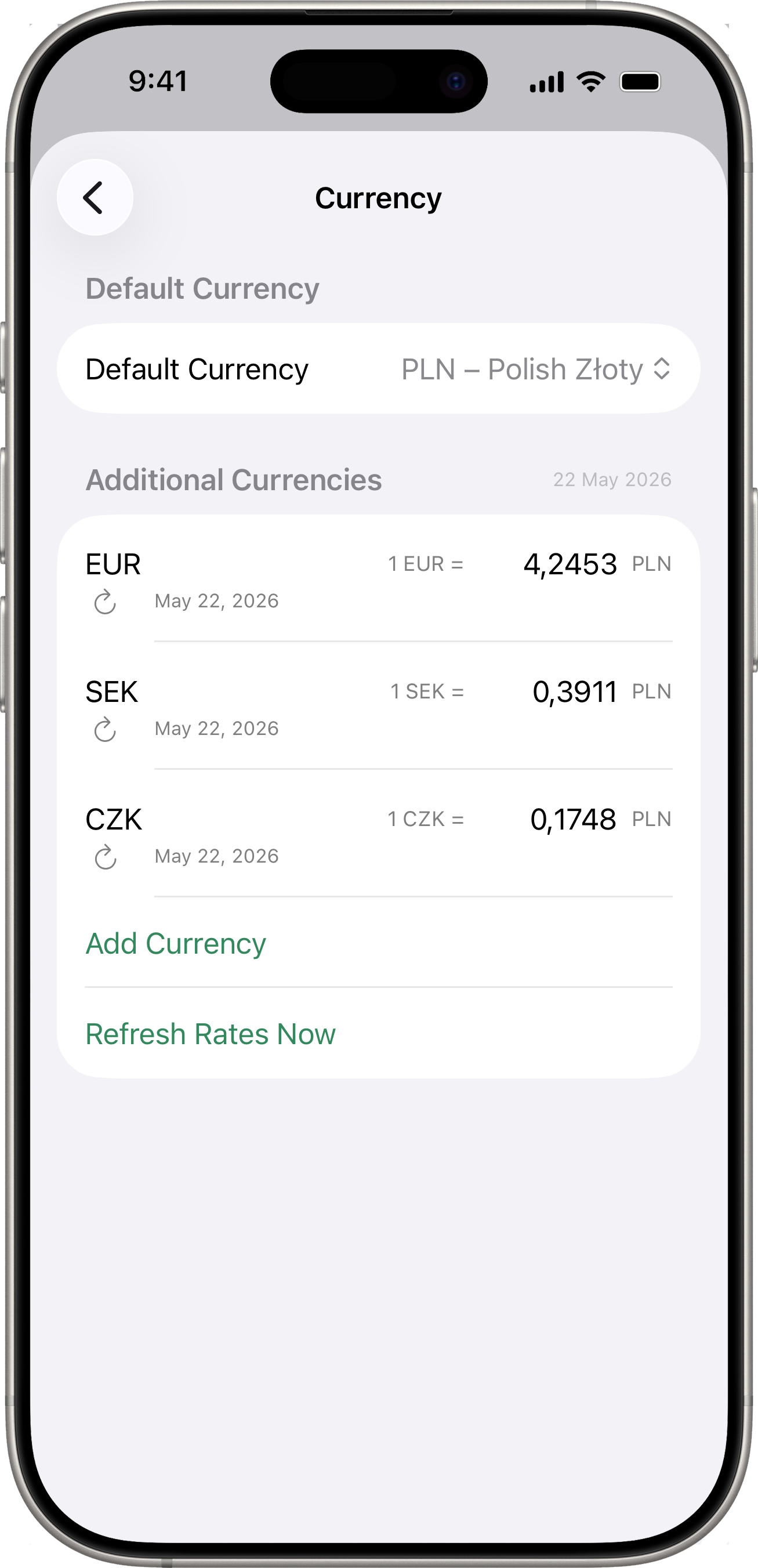
Exchange rates are fetched automatically from the NBP (National Bank of Poland) API. Rates are updated periodically and can be refreshed manually.
Automatic Rates
- The app fetches exchange rates from NBP when you add a new currency or when rates are refreshed.
- The date of the last rate update is shown in the currency settings.
Manual Rates
You can override any exchange rate manually:
- Tap the rate value for a currency in the settings.
- Enter your preferred rate.
- The currency will be marked as “Manual”.
- To revert to the NBP rate, tap Reset to NBP.
How Rates Work
Rates are expressed as: 1 [additional currency] = X [default currency].
For example, if your default currency is PLN and you add EUR with a rate of 4.30, it means 1 EUR = 4.30 PLN. When you log a fill-up for 50 EUR, the app records it as approximately 215 PLN in your stats and charts.
Removing a Currency
Swipe left on a currency in the settings to remove it. This does not affect previously recorded entries — they keep the exchange rate that was active when they were saved.